
Providers and models
A provider is where models come from, such as Anthropic or OpenAI. Bica needs at least one before a session can start. You connect them in Settings → Providers, then pick in Settings → Models which model does what.
Connect a provider
Section titled “Connect a provider”Press Add provider and pick one of two ways:
- Sign in with a plan uses a subscription such as Claude Max or ChatGPT Plus. A sign-in page opens. On the machine that runs
bicait comes back by itself; from a phone or another computer, the provider gives you a code to copy or type instead. - Add an API key takes a key you paste, and you pay per request.
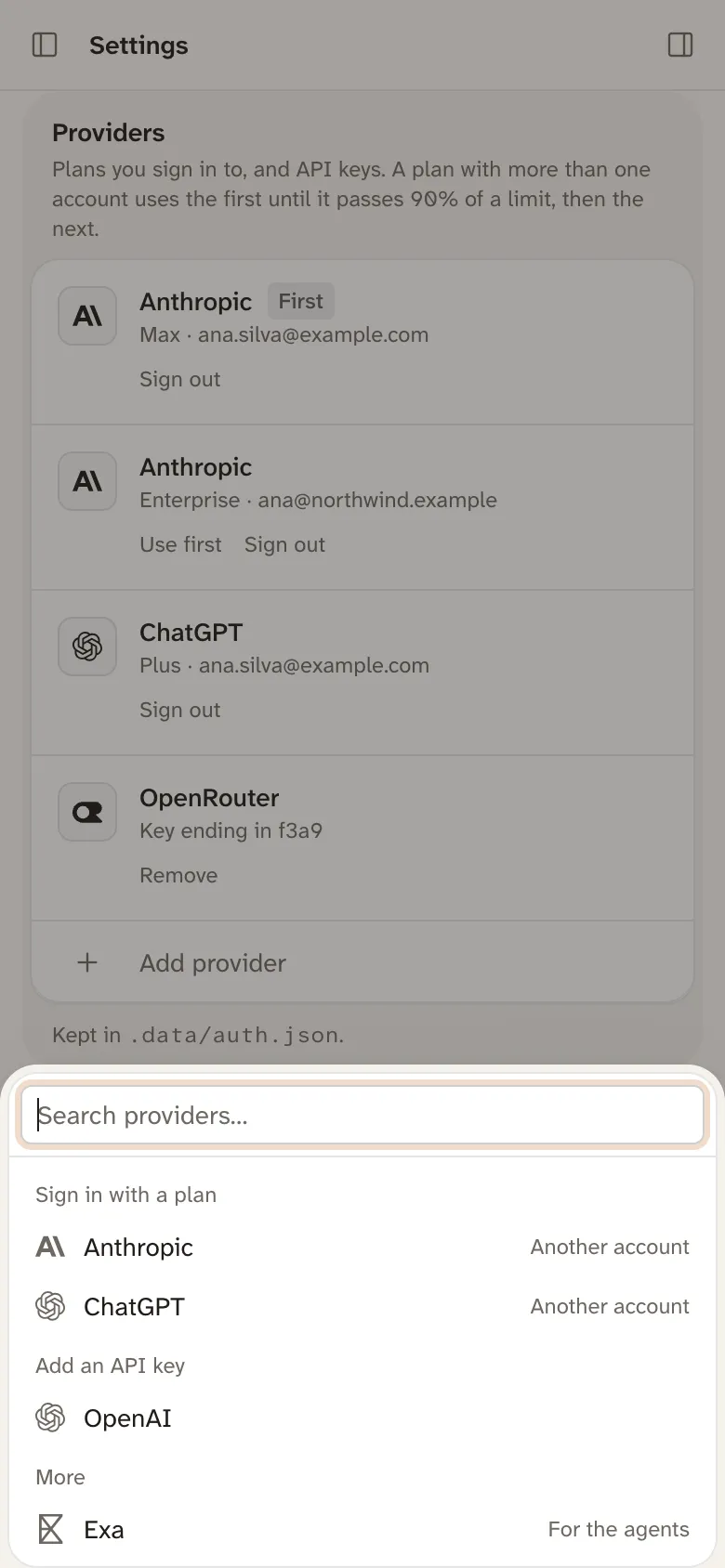
The list has every provider Bica’s model library knows, from Anthropic, OpenAI, and Google to OpenRouter and GitHub Copilot.
Bica only uses the keys and sign-ins listed here. It never reads them from environment variables or from another app’s login.
A ChatGPT plan can sign in two ways: Sign in with ChatGPT under OpenAI, or the older OpenAI Codex (legacy). Voice needs the legacy one.
More than one account on a plan
Section titled “More than one account on a plan”Once a plan is signed in, Add provider offers it again as Another account, say a personal and a work Claude plan. The accounts take turns. Requests go to the one marked First until it passes 90% of a limit or loses its sign-in, then move to the next. Use first on a row changes the order.
Accounts don’t share a prompt cache, so a switch resends the conversation once. The foot of the sidebar shows each account’s usage for the open session’s model, and night runs check the same numbers before they start.
Exa turns on web search
Section titled “Exa turns on web search”Exa isn’t a model provider. Add its key under More in Add provider, and the agent’s web search and fetch tools start working. Exa’s free plan is enough.
The default and fast models
Section titled “The default and fast models”Settings → Models picks two models:
- New sessions is the model and effort every new session starts with. You can switch one session in its model picker.
- Fast model is a small, cheap model that titles sessions and writes commit messages. Without one, a title is the prompt’s first words and you write commit messages yourself.
If you set PI_MODEL or PI_FAST_MODEL before starting bica, they fill in until you pick in Settings. See CLI.
The Model picker card below Models narrows which models the picker in each session offers. With none chosen, it offers them all.